
There are several ways to consume Registry data. Some methods require a Credential Engine organization account, approval from Credential Engine to consume data, or advanced technical knowledge.
For technical specifications on consuming Registry data, visit the Registry Handbook.
For more information and to learn more about Credential Engine’s technical services, contact Credential Engine.
Consuming Methods
Use the table below to compare each method by use case, output, access requirements, and technical level. Details for each method follow.
Method |
Best For |
Output |
Account Required |
Approval Required |
Technical Level |
| Credential Finder Export | Quick access to subsets of Registry data via easy access web pages | CSV JSON-LD |
No | No | Low |
| Credential Finder Widget | Viewing custom Credential Finder search results that can be embedded on a website or downloaded | Web CSV |
Yes | Yes | Low |
| HTTP GET Request | Direct access to JSON data using CTIDs | JSON-LD | No | No | Advanced |
| ZIP of All Registry Data | When all Registry data is useful for familiarizing with the data structure, importing to graph or similar data store | JSON-LD | Yes | No | Low |
| Registry Search API | Simple to complex, real-time queries | JSON-LD | Yes | Yes | Advanced |
| Download Bulk Data | Offline storage of bulk dataset | JSON-LD SQL database |
Yes | Yes | Advanced |
Credential Finder Export
The Credential Finder export is the simplest way to access Registry data and does not require an account or approval. Users can search by resource type and apply filters to refine results, then download the data as a CSV file.
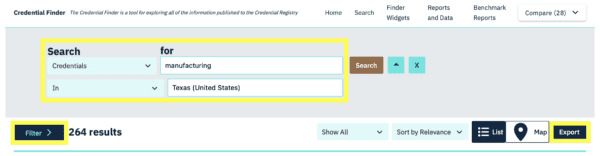
This method is best for quick access to a subset of Registry data, including key fields such as name, description, provider, subject webpage, classification codes, and other data elements provided by publishers. Users must accept Credential Engine’s Privacy Policy and Terms of Use. This method does not support exporting competency frameworks or competency collections.
Choose one of the following options to export data from an individual resource page.
Registry Data (JSON-LD)
View or download the record’s raw metadata by clicking Registry Data under Additional Information.
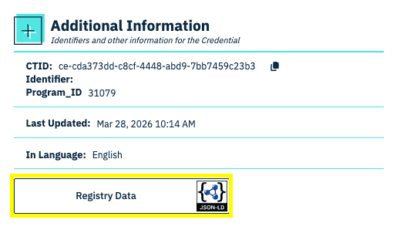
You can also view the Envelope or Resource.

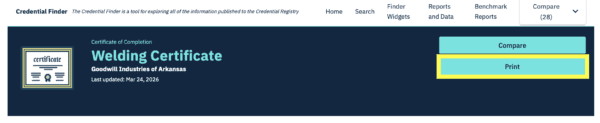
Print to PDF
Click Print at the top of the page to download a nicely formatted PDF of the record.

Credential Finder Widget
Widgets display customized search results within the Credential Finder app. Widgets can be configured to filter results by location, organization(s), or relationships such as Offered By or Accredited By.
Once configured, widgets are relatively easy to use and support CSV data exports. Finder widgets have customizable URLs and can be embedded on a website.
Learn more about the value of Credential Finder widgets for states and training providers.
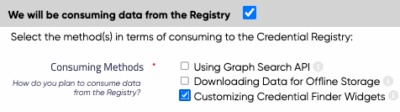
This method requires a Credential Engine account and approval. Please take the following steps.
- Create a Credential Engine account.
- On the organization detail page, select Consuming + Customizing Credential Finder Widgets.

- Send an email that describes your intended use cases to Credential Engine.
HTTP GET Request
An HTTP GET request allows users to retrieve a specific record directly from the Registry when the CTID is known. This method returns structured JSON-LD data and does not require an account or approval. It is best suited for technical users who need direct access to individual records and are familiar with HTTP requests and linked data formats.
Additional details are available in the Registry Handbook.
ZIP of All Registry Data
Account users can download the full Credential Registry dataset from the Accounts System.
From the Account Dashboard, go to Download All Credential Registry Data and select Download.

The data is provided as JSON-LD files packaged in one or more .zip files.
This method requires a Credential Engine account; consuming approval is not required.
Registry Search API
The Registry Search API supports complex, real-time queries across Registry data and returns results in JSON-LD format. It is designed for advanced users who need to query data dynamically and work with linked data relationships. Users should have familiarity with JSON-LD, RDF, CTDL, and linked data concepts.
This method requires a Credential Engine account and approval. Please take the following steps.
- Review the consuming resources outlined in the Registry Handbook.
- Create a Credential Engine account.
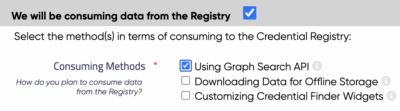
- On the organization detail page, select Consuming + Using Graph Search API.
- Send an email that describes your intended use cases to Credential Engine.
Credential Engine offers a Developer Integration program for businesses or vendors who want to integrate with the Credential Registry.
Download Bulk Data
Bulk data download provides access to the full Registry dataset for offline use within your own system. Data is provided as JSON-LD files or a SQL database and does not support CSV format.
This method is best suited for advanced users who need complete data access and have the technical capacity to store and manage large datasets.
This method requires a Credential Engine account and approval. Please take the following steps.
-
Review the consuming resources outlined in the Registry Handbook.
-
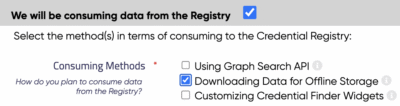
On the organization detail page, select Consuming + Downloading Data for Offline Storage.
-
Send an email that describes your intended use cases to Credential Engine.
Researchers can access this bulk download feature with a signed Research Agreement.