
There are several ways to get data out of the Credential Registry. Some are as simple as searching and clicking Download. Others are for developers building Registry data into their own systems.
You don’t need to be technical or know every option to pick one. Start with what you want to do with the data, and we’ll point you to the best fit.
For more information and to learn more about Credential Engine’s technical services, contact Credential Engine.
What do you want to do with Registry data?
Pick the option closest to your goal.
I want to look up or share information about a few credentials, programs, or providers.
Advisors, counselors, staff, students, general questions
Use the Credential Finder Export. You don't need an account. Search, filter, and download results as a CSV, or print any record as a PDF.
I want to show a filtered list of credentials on my organization's website.
States, workforce boards, training providers, associations
Use a Credential Finder Widget. You'll set up a custom search, for example by location or provider, that you can embed or link to. This needs an account and approval.
I want to analyze Registry data for research or policy work.
Researchers, analysts, policy staff
For a smaller slice of data, start with the Credential Finder Export. For the full dataset, use Download Bulk Data. Researchers can get access with a signed Research Agreement.
I want to build Registry data into an app, website, or system.
Developers, vendors, IT staff
- Need one record and have its CTID? Use an HTTP GET Request. No account needed.
- Need live, flexible searches? Use the Registry Search API. You can try queries first in the Query Helper without an account.
- Need a full copy of the data in your own system? Use Download Bulk Data.
- Vendors integrating with the Registry should also look at our Developer Integration program.
Still not sure? Email us at info@credentialengine.org and tell us what you're trying to do. We'll help you find the right option. Knowing your purpose also helps later, since the account and approval steps ask you to describe your intended use.
Consuming Methods
Use the table below to compare each method by use case, output, access requirements, and technical level. Details for each method follow.
Method |
Best For |
Output |
Account Required |
Approval Required |
Technical Level |
| Credential Finder Export | Quick access to subsets of Registry data via easy access web pages | CSV JSON-LD |
No | No | Low |
| Credential Finder Widget | Viewing custom Credential Finder search results that can be embedded on a website or downloaded | Web CSV |
Yes | Yes | Low |
| HTTP GET Request | Direct access to JSON data using CTIDs | JSON-LD | No | No | Advanced |
| Registry Search API | Simple to complex, real-time queries | JSON-LD | Yes | Yes | Advanced |
| Download Bulk Data | Offline storage of bulk dataset | JSON-LD SQL database |
Yes | Yes | Advanced |
Credential Finder Export
The Credential Finder export is the simplest way to access Registry data and does not require an account or approval. Users can search by resource type and apply filters to refine results, then download the data as a CSV file.
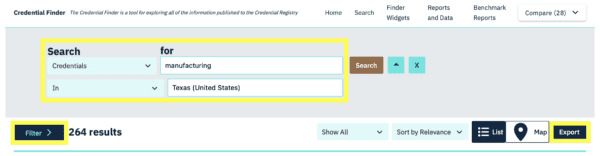
This method is best for quick access to a subset of Registry data, including key fields such as name, description, provider, subject webpage, classification codes, and other data elements provided by publishers. Users must accept Credential Engine’s Privacy Policy and Terms of Use. This method does not support exporting competency frameworks or competency collections.
Choose one of the following options to export data from an individual resource page.
Registry Data (JSON-LD)
View or download the record’s raw metadata by clicking Registry Data under Additional Information.
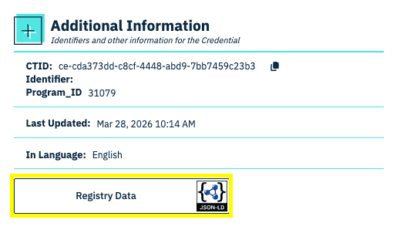
You can also view the Envelope or Resource.

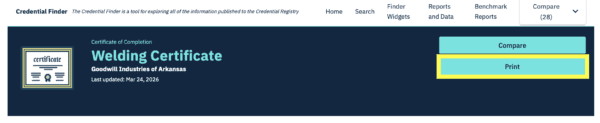
Print to PDF
Click Print at the top of the page to download a nicely formatted PDF of the record.
Credential Finder Widget
Widgets display customized search results within the Credential Finder app. Widgets can be configured to filter results by location, organization(s), or relationships such as Offered By or Accredited By.
Once configured, widgets are relatively easy to use and support CSV data exports. Finder widgets have customizable URLs and can be embedded on a website.
Learn more about the value of Credential Finder widgets for states and training providers.
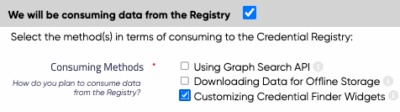
This method requires a Credential Engine account and approval. Please take the following steps.
- Create a Credential Engine account.
- On the organization detail page, select Consuming + Customizing Credential Finder Widgets.

- Send an email that describes your intended use cases to Credential Engine.
HTTP GET Request
An HTTP GET request allows users to retrieve a specific record directly from the Registry when the CTID is known. This method returns structured JSON-LD data and does not require an account or approval. It is best suited for technical users who need direct access to individual records and are familiar with HTTP requests and linked data formats.
Additional details are available in the Registry Handbook.
Registry Search API
The Registry Search API supports complex, real-time queries across Registry data and returns results in JSON-LD format. It is designed for advanced users who need to query data dynamically and work with linked data relationships. Users should have familiarity with JSON-LD, RDF, CTDL, and linked data concepts.
Anyone can use the Search API Guide and Query Helper without a Credential Engine account. The Query Helper is a tool to help developers build, test, and experiment with queries.
This method requires a Credential Engine account and approval. Please take the following steps.
- Review the consuming resources outlined in the Registry Handbook.
- Create a Credential Engine account.
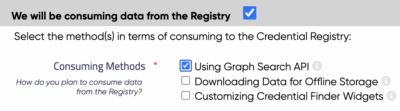
- On the organization detail page, select Consuming + Using Graph Search API.
- Send an email that describes your intended use cases to Credential Engine.
Credential Engine offers a Developer Integration program for businesses or vendors who want to integrate with the Credential Registry.
Download Bulk Data
Bulk data download provides access to the full Registry dataset for offline use within your own system. This method is best suited for advanced users who need complete data access and have the technical capacity to store and manage large datasets. Review the Registry Handbook for technical specifications.
There are several bulk download options.
- Download a ZIP file of all Registry data (JSON-LD)
Account users can download the full Credential Registry dataset from the Accounts System. The data is provided as JSON-LD files packaged in one or more .zip files. - Download targeted datasets in separate files (JSON-LD)
Enables downloading updated JSON-LD files from the Registry on a regular schedule. It can be configured using queries to filter for specific CTDL properties and download only data that has changed. - Transformed data in a SQL database
Converts downloaded data to a SQL data structure for direct use by your system.
Researchers can access this bulk download feature with a signed Research Agreement.
This method requires a Credential Engine account and approval. Please take the following steps.
-
Review the consuming resources outlined in the Registry Handbook.
-
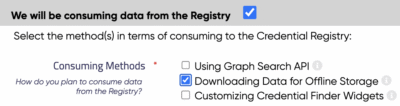
On the organization detail page, select Consuming + Downloading Data for Offline Storage.
-
Send an email that describes your intended use cases to Credential Engine.
Researchers can access this bulk download feature with a signed Research Agreement.